 Access
Navigation guide
This manual provides a brief guide to the functions of the online version of Catalogue of Development Partners in the Mekong Delta. The contents of this guide include:
1. Homepage
Accessing the website at the address https://coastal-protection-mekongdelta.com/DP/Catalogue/ leads to the homepage of the Online Catalogue.This home page includes the following function buttons and content tabs:
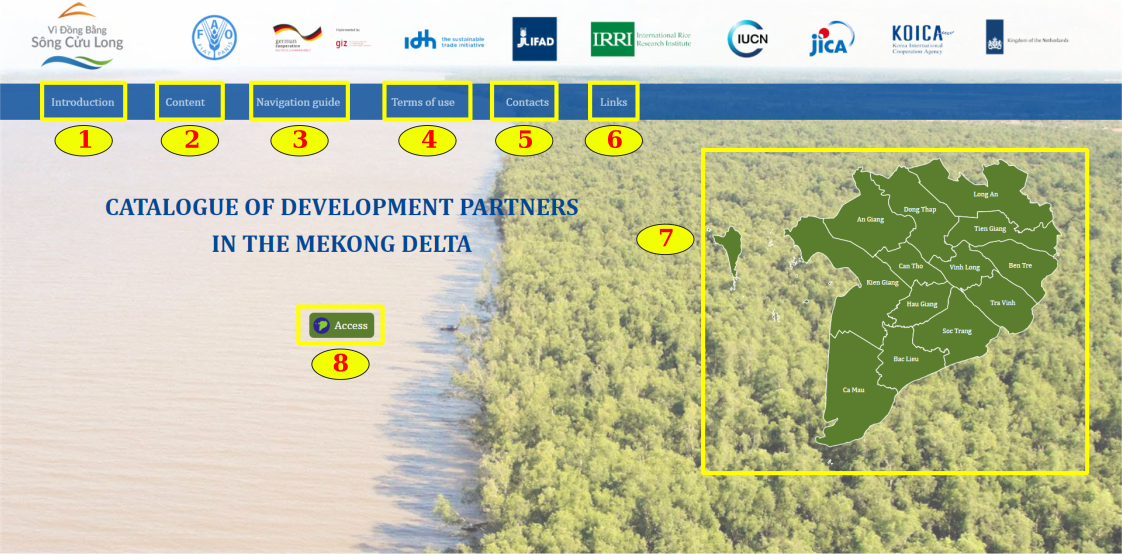
Figure 1: Main interface and homepage components
Figure 1 depicts the Online Catalogue homepage with the following components:
(1)-(2): Introduction and overview description of Online Catalogue’s information and content;
(3)-(4): Terms of use and instructions for using Online Catalogue;
(5): Contact information;
(6): Weblinks to related parties' websites;
(7): Map of the Mekong Delta with quick access to Online Catalogue of each province by administrative boundaries;
(8): Button to access Online Catalogue
2. WebGIS User Manual
Entering through the Access button (8) or the Mekong Delta map with quick access to each province as shown in Figure 1 will lead users to the WebGIS of DPs Catalogue (Figure 2).
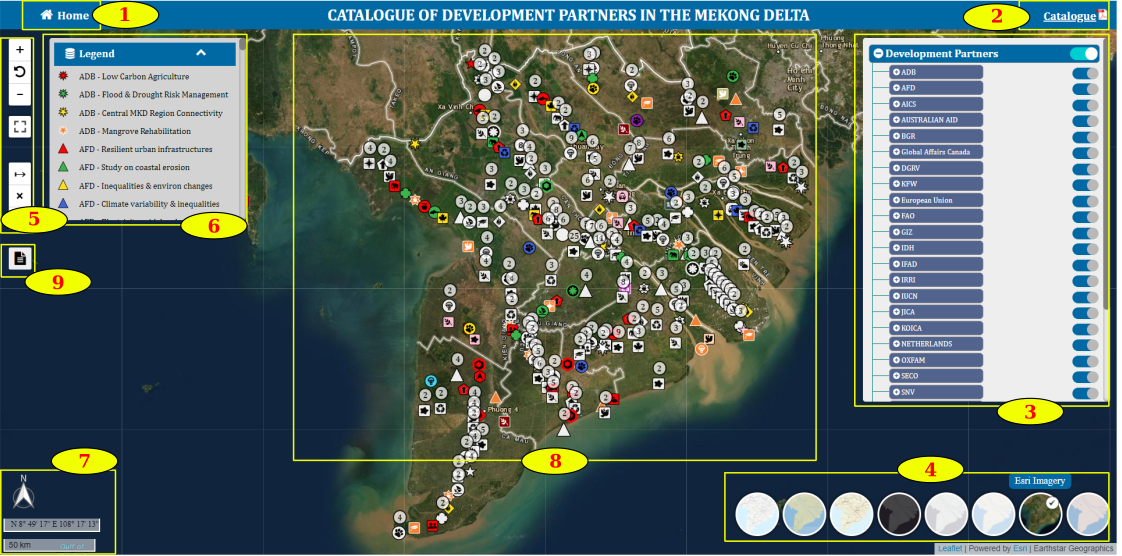
Figure 2: WebGIS Map page of DPs Catalogue
The map page includes:
(1): Back to home button
(2): DPs Catalogue download button (Click the button to download the PDF printout)
(3): Data display and filter toolbar
(4): Basemap toggle bar
(5): Map interaction tools (Zoom control, Reset zoom, Fullscreen, Distance tool)
(6): Legends dialogue
(7): North arrow, scale bar and coordinate display bar when moving the mouse
(8): Map to display data
(9): Button containing a link to the report export page
2.1. Data display and filter
Data display and filter operations are performed in the Data display and filter toolbar. This toolbar is designed as a treeview with function tags as follows:
(1) Development Partners
Contains the list of DPs and their projects. Provides per-project, per-DP or all-view visibility. (Figure 3)
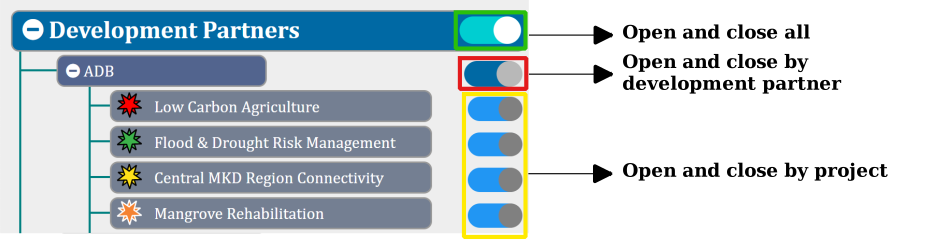
Figure 3: Simulation of the data display toolbar
(2) Filters
The filter tab built with 7 filters allows visibility of projects by Province, by Area of operation, by Donor, by Policy, by Project status, by Executing Agency and by Amount of Funding.
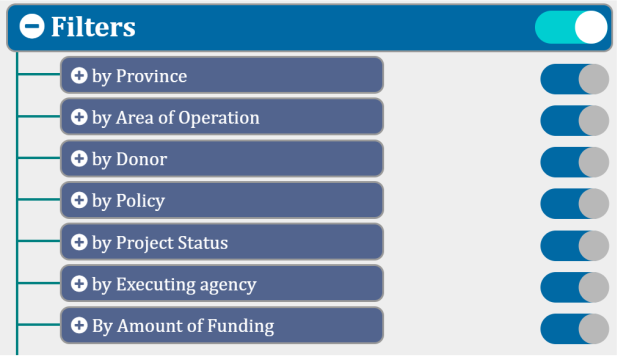
Figure 4: Simulation of the data filtering tool
* How to use any filter
When the user wants to sort the data by any filter, i.e. if the user wants to search for projects by province, turn on all other filters (donor, policy) and apply the interested province in the province filter. The operation is as follows:
(1) Turn on interested DPs and projects at the Development Partners tag.
(2) Turn off the provinces of no interest in the province filter (Remaining filters must be turned on).
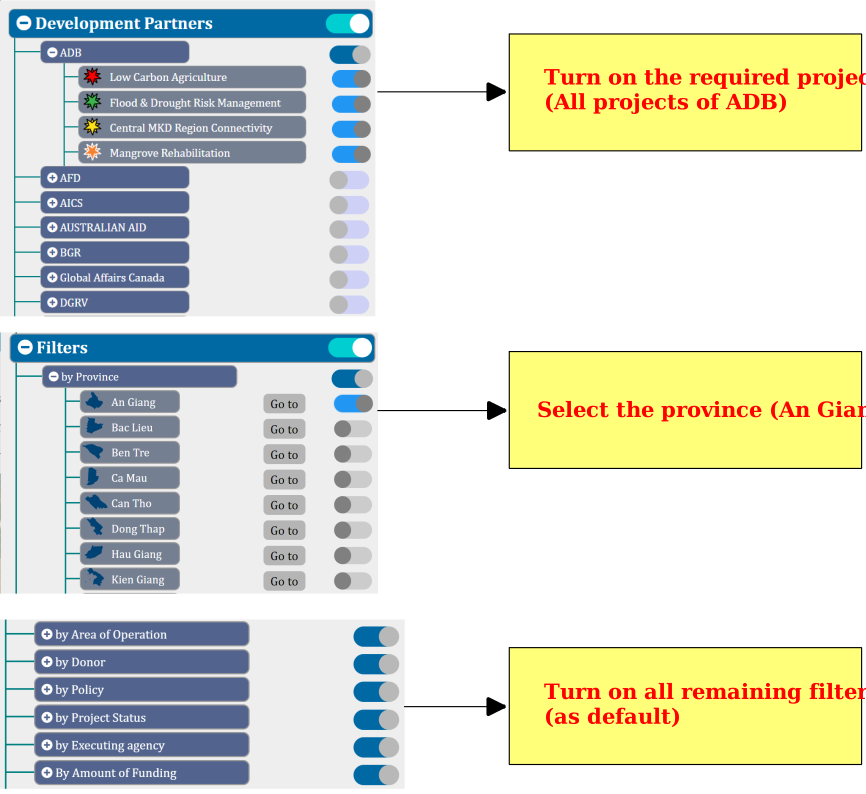
Figure 5: Guidelines for filtering data by province
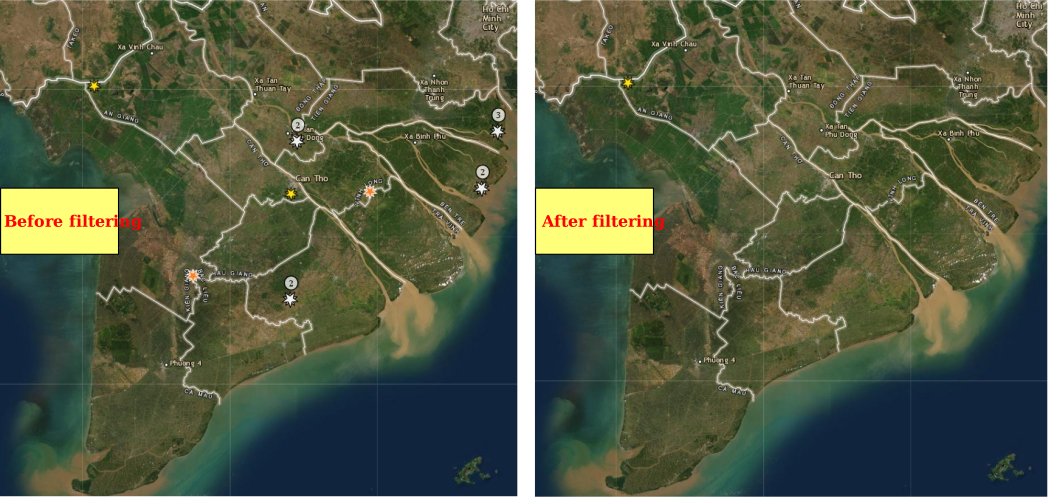
Figure 6: Results of data filtering by province
* How to use the “Delta-wide” layer in the Province filter
For projects sorted by the “Delta-wide” layer, their range of operation spreads among the entire Mekong Delta regional level (not at a particular province). The operation is as follows:
(1) Turn on interested DPs and projects at the Development Partners tag.
(2) Turn off the provinces of no interest and turn on "Delta-wide" in the province filter (Remaining filters must be turned on).
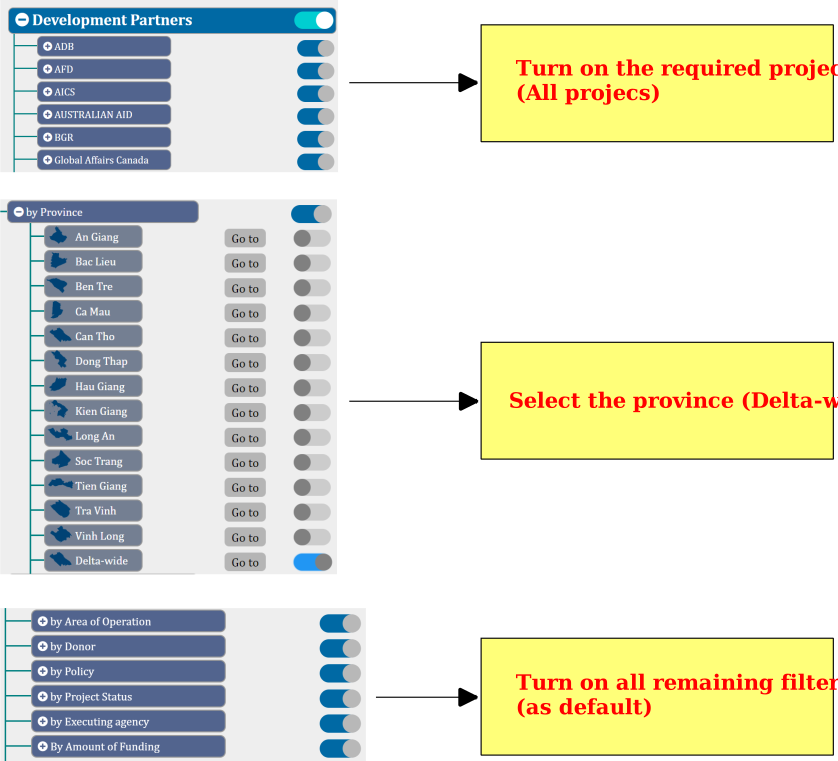
Figure 7: How to use the “Delta-wide” layer in the Province filter
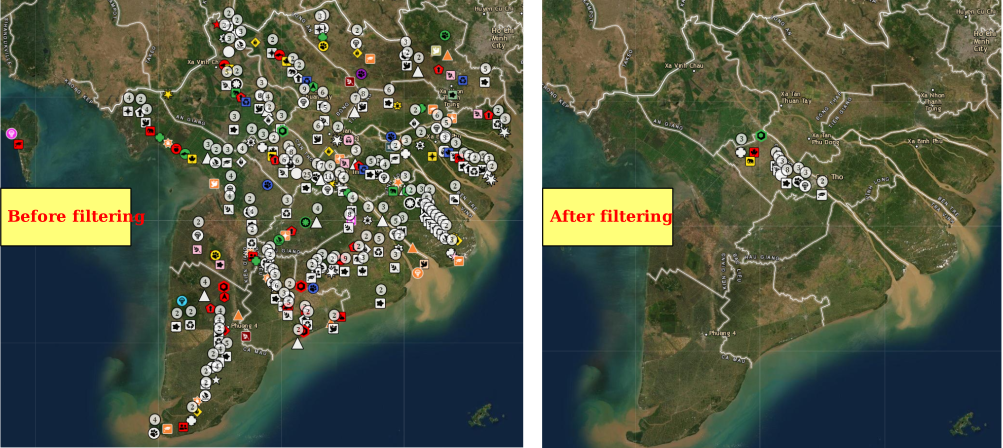
Figure 8: Results of using the “Delta-wide” layer in the Province filter
* How to use “None or Others” layer in any filter
For Donor, Policy, Project status, Executing agency, Amount of Funding filters, users can apply the “None or Others” layer. Projects that do not identify any donor/policy/status/agency/amount of funding in the respective category are clustered to this layer. If their cited items do not fit into the other existing filters, they are also classfied in this layer. The operation is as follows (Example for Filter by Amount of Funding):
(1) Turn on interested DPs and projects at the Development Partners tag.
(2) Turn off the "Amount of Funding" of no interest and turn on "None or Others" in the filter by Amount of Funding (Remaining filters must be turned on).
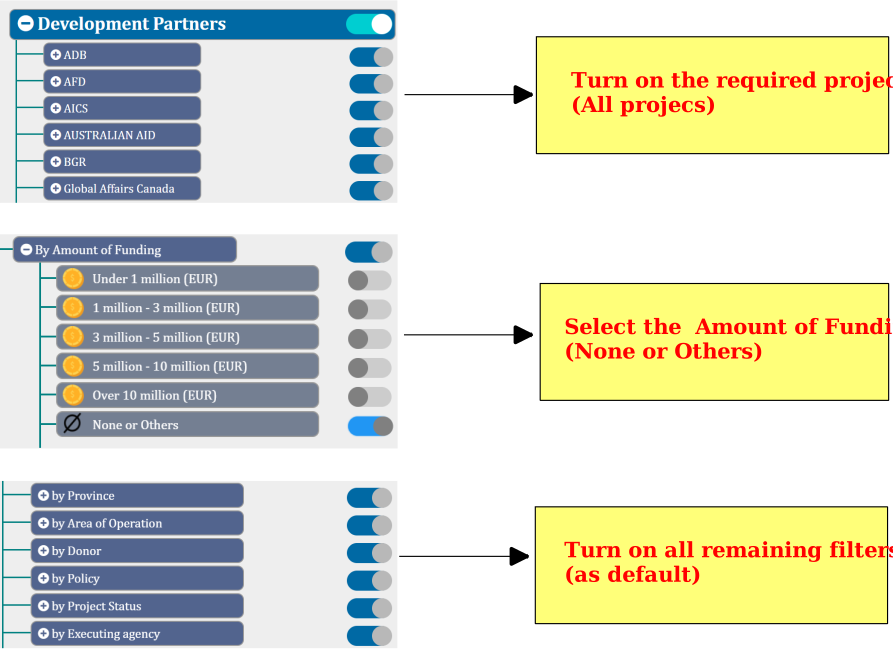
Figure 9: How to use the “None and Others” layer in any filter
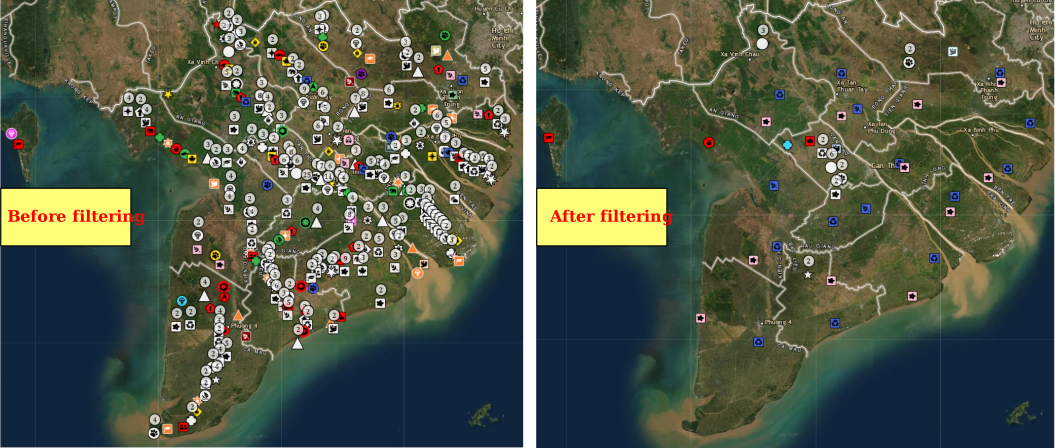
Figure 10: Results of using the “None or Others” layer in the filter by Amount of Funding
* How to combine 2 or more filters
Cross-filtering is possible. Take the example of using filters to open all projects of all DPs in Province: An Giang, Area of Operation: Agriculture & food security, Donor: Australia, Policy: Provincial Master Plans, Project Status: Ongoing, Executing agency: MPI, Amount of Funding: 1 million - 3 million (EUR). The operations are performed as follows.
(1) Turn on all projects of DPs
(2) At the Province filter -> Turn on An Giang province, turn off the remaining provinces
(3) At the Area of Operation filter -> Turn on Agriculture & food security, turn off the remaining areas
(4) At the Donor filter -> Governments -> Turn on Germany, turn off the remaining donors
(5) At the Policy filter -> Provincial policy -> Turn on Master plans, turn off the remaining policies
(6) At the Project status filter -> Turn on Ongoing, turn off the remaining project statuses
(7) At the Executing agency filter -> National agencies filter -> Turn on MPI and turn off the remaining agencies
(8) At the Amount of Funding filter -> Turn on 1 million - 3 million (EUR) and turn off the remaining amounts of funding.
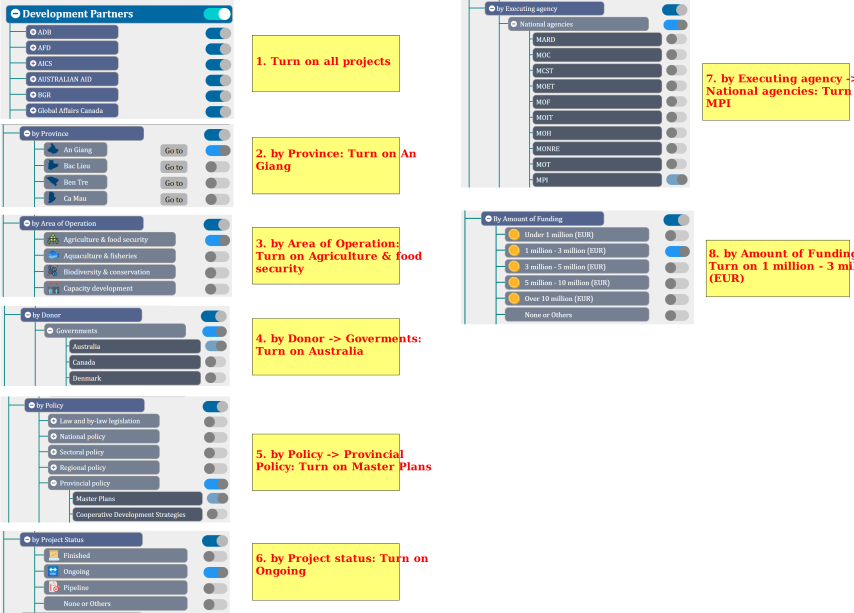
Figure 11: Instructions for combining filters
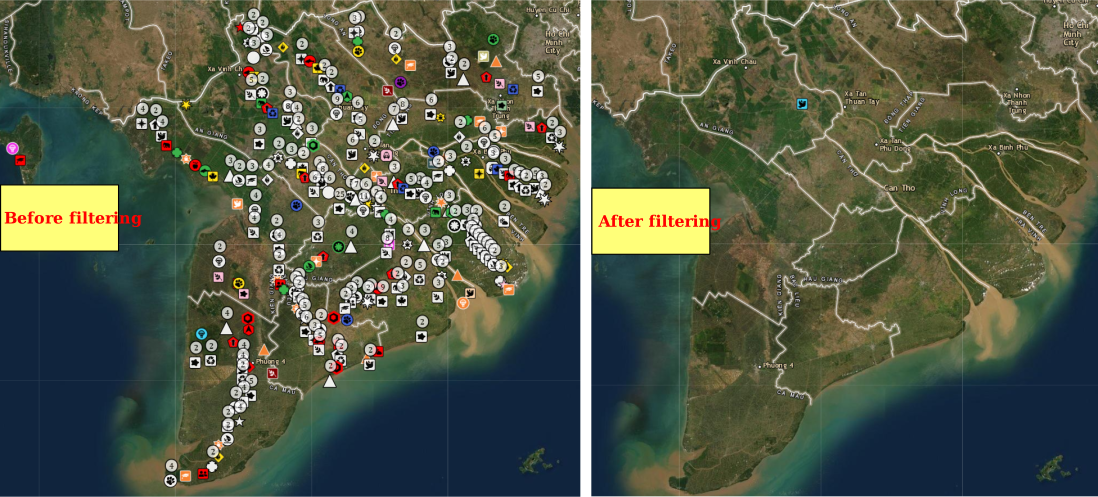
Figure 12: Results of combining filters
2.2. Interaction with data
* Zoom in and out of the map
On the map toolbar, click on the icon to zoom in on the map, the icon
  to zoom out the map and the icon
  to reset zooming to the Mekong Delta view. To view the full screen, click the icon
  The locations of these symbols are shown in Figure 13.
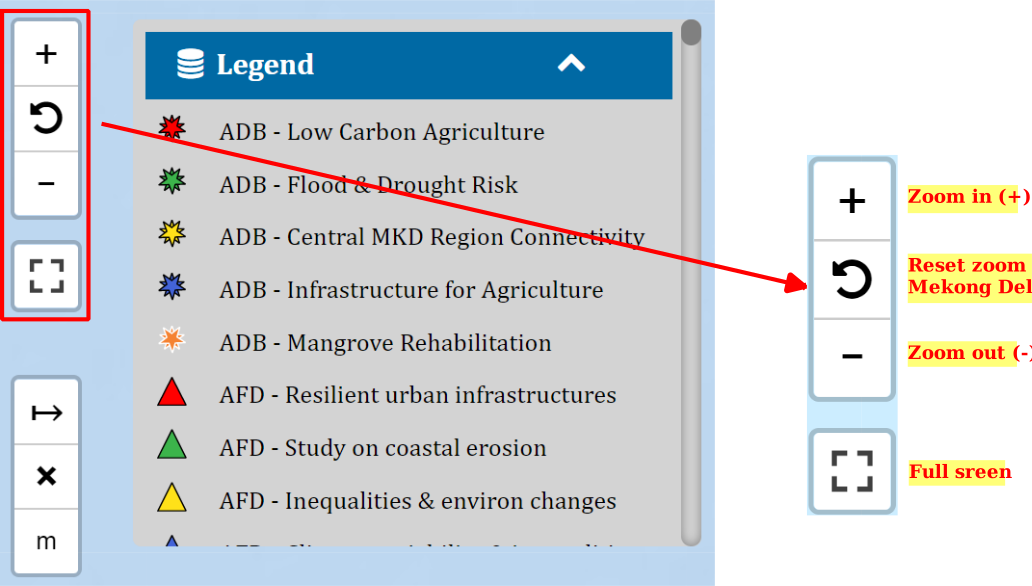
Figure 13: Map zoom function button
* Distance measurement tool on the map
On the map toolbar, select the icon  to measure the distance, the icon
  to stop the measurement and the icon
  to change the measurement unit.
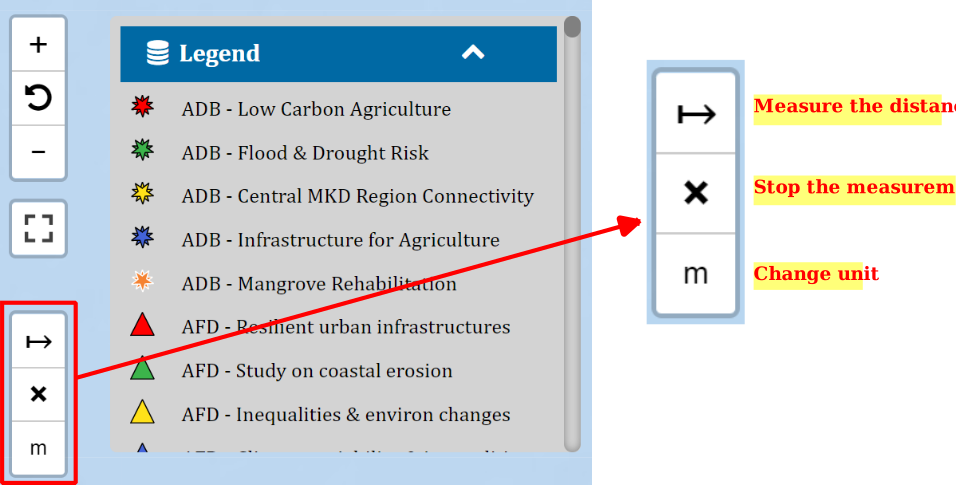
Figure 14: measurement Mapping function button
2.3. Display data information on the map background
After turning the data on and off and using the filter, the corresponding data will display on the map background. To view the contents such as DP title, project title, area of operation, etc., click on the respective data point you want to display. At this point, a popup appears with content tags including:
- Title of Development Partners
- Logo of DPs
- Project title
- Areas of operation
- Project description
- Contribution to Vietnamese policy frameworks
- Project timeframe
- Location
- Vietnamese executing agency
- Implementation partner(s)
- Donors
- Type of funding
- Amount of funding
- Additional info
- Materials
- Photos
- Videos
- Catalogue
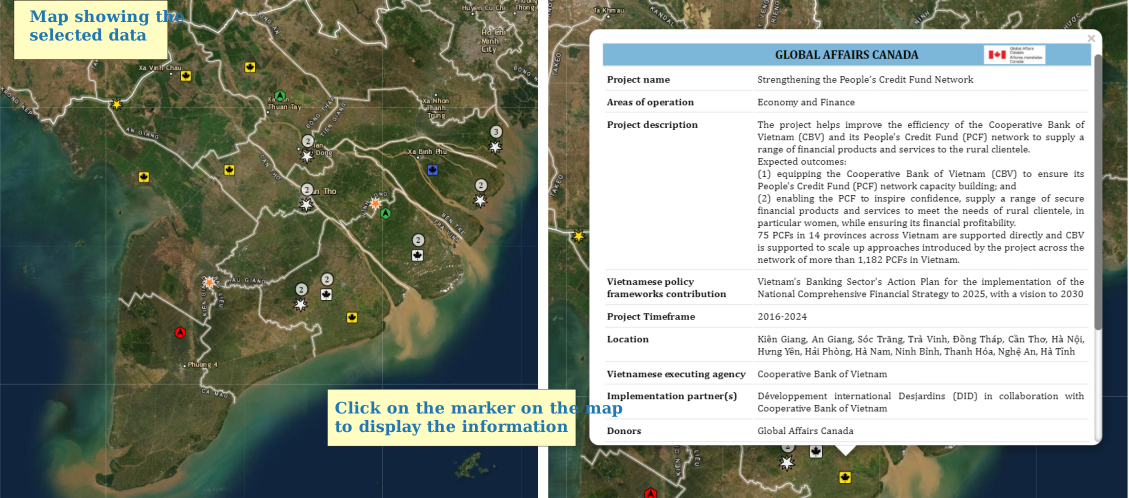
Figure 15: Illustrated information display on the map background
3. Instructions for using the report export page
3.1. Components of the report export page
Click the icon  (9) (Figure 1) to reach the report export page. This report export page includes the following functions and contents:
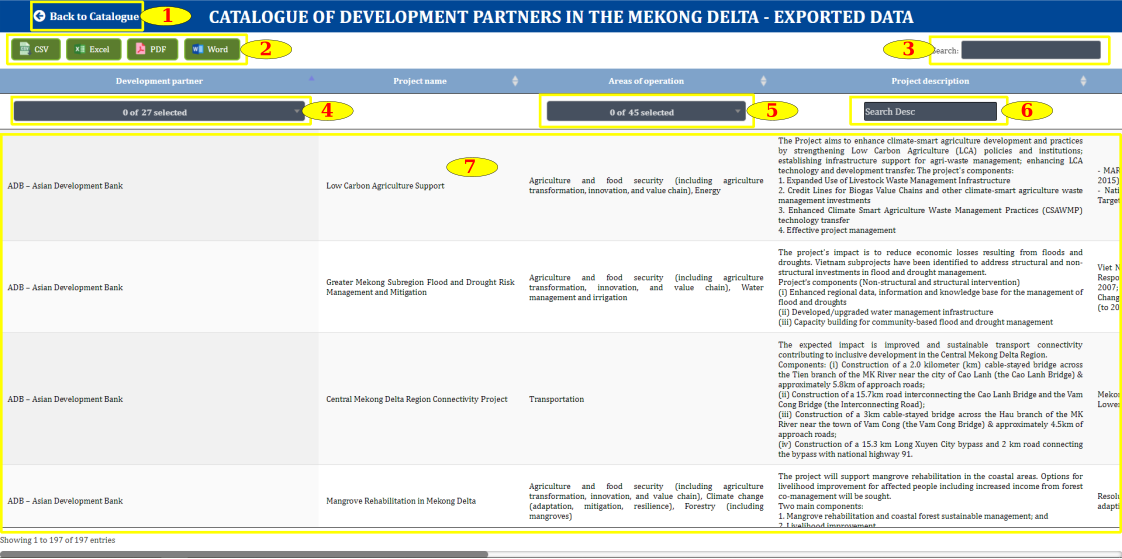
Figure 16: Components of the report export page
Figure 16 depicts the report export page with the following components:
(1) WebGIS of DPs Catalogue page return button
(2) Catalogue export buttons as CSV, Excel, PDF and Word formats
(3) Search the projects in the datasheet by keyword
(4) Filter data by column
(5) Project information display panel
Note: To display all information, users need to scroll horizontally and vertically
3.2. Instructions for exporting reports
* Export all projects
To download data of all projects, the user does not need to use the filter and can select the download format  . The icon location is shown in Figure 16 (2).
* Export data by filter
Data in the columns are filtered by 2 formats:
(1) Select from drop-down options: Used for fields with fixed information such as DP title, Area of Operation.
(2) Search with Keyword: Used for open-ended fields such as Project description, Policy contribution.
To export the data report, the user first applies the filter in the columns and then clicks the download icon in 3 designed formats.
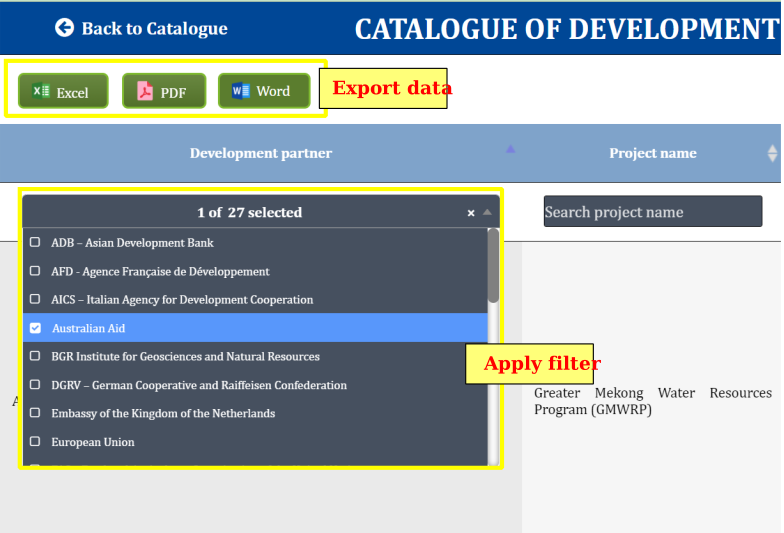
Figure 17: Illustration of using filter to export data report